Top 3 Download Manager Apps For Windows
Whether you do your downloading via BitTorrent, FTP, or plain old HTTP, efficiently sucking files down from the cloud onto your hard drive takes the right tools. Whether you're a web video addict, constant software downloader, MP3 freak, or BitTorrent junkie, we've got some power downloading tools for you. Step inside for our picks of the best free download managers that get you the files you want fast and easy.
1. INTERNET DOWNLOADER MANAGER

About:
An Internet Download Manager / Accelerator is a computer program used to manage your downloads easily.It includes comprehensive error recovery and resume capability which helps in restarting broken downloads due to connection failures.It can also increase download speeds by splitting a file into many segments which are then moved in parallel.
Features:
Common features of Download managers should include,
- Pause and resume downloads
- Schedule download
- Search for mirror sites
- Limit bandwidth
- Batch file download
- Browser Integration
- Anti virus scanning
- Multi-section download
- Check sums
 |
| Developer: License / Price: Size / OS: Last Updated: Category: | Download Manager Tonec Inc Trial / USD 24.95  4.3 MB / Windows All C: \ Internet \ Download Managers |

2. Orbit Downloader 
Orbit Downloader is more than just a download manager. It includes web 2.0 downloading, such as video/music/streaming media from Myspace, YouTube, Imeem, Pandora, Rapidshare, support RTMP.
|
| Developer: License / Price: Size / OS: Last Updated: Category: | OrbitDownloader Ad-supported / $0 4.3 MB / Windows All C: \ Internet \ Download Managers |
3. Download Studio

Download Studio has the best user interface.It helps to take the pain and confusion out of downloading files with a step-by-step Download Wizard.
Pros : User interface, Download Wizard, Customize browser intergration
Cons : Corrupts downloads at rare occasions, No mirror downloading,
License : Shareware ($24.95 as on 07/02/2010)
Cons : Corrupts downloads at rare occasions, No mirror downloading,
License : Shareware ($24.95 as on 07/02/2010)
|
| Developer: License / Price: Size / OS: Last Updated: Category: | Conceiva Trial / USD 24.95 29.4 MB / Windows 2K / XP / Vista / XP X64 / Vista64 / 7 / 7 x64 C: \ Internet \ Download Managers |
Top 3 Download Manager Apps For MAC

Folx is the best download assistant for Mac. Folx is a free download manager for Mac OS X. Its friendly interface will help you take the most of your downloads. It’s not overloaded with tons of unnecessary features and is extremely easy to use. All you have to do to download files is click the link in your web browser and Folx will catch it.
By the way, Folx is a 2-in-1 app: you don’t need one program for common downloads and other one to download torrents. Folx can handle both as a piece of cake.
| Developer: License / Price: Size / OS: Binary Format: Last Updated: Category: | Eltima Software Demo / USD 19.95 14.2 MB / Mac OS X 10.4 or later  Universal Binary Universal BinaryDecember 5th, 2011, 05:47 UTC Home / Internet Utilities |
|
2. iGetter Download Manager
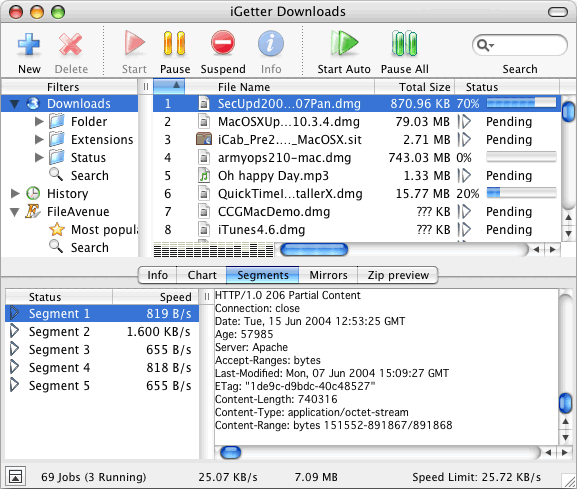
· iGetter resumes broken downloads, checking date and size.
· iGetter supports Segmented (Accelerated) downloading. This basic feature of iGetter can greatly improve the speed of your downloads.
· iGetter supports HTTP and FTP protocols as well as HTTPS and FTP over SSL implicitly and explicitly.
· Getter includes a Site Explorer that allows exploration of entire web or FTP sites, so you can easily find and download files you’re interested in. When the Site Explorer is used iGetter displays the web contents rendered in a separate view below the site tree. This makes the process of exploration very convenient as you see the web page directly in iGetter as you would with a web browser. When you reach the file or files you’re interested in downloading, you can easily add them to the iGetter queue. To use the web content view feature with the Mac version you must install Safari 1.0 or later.
| Developer: License / Price: Size / OS: Binary Format: Last Updated: Category: | Presenta Ltd. Shareware / USD 25.00 3.5 MB / Mac OS X 10.2 or later Universal BinaryOctober 14th, 2011, 08:37 UTC Home / Internet Utilities |
3. Download Accelerator Plus
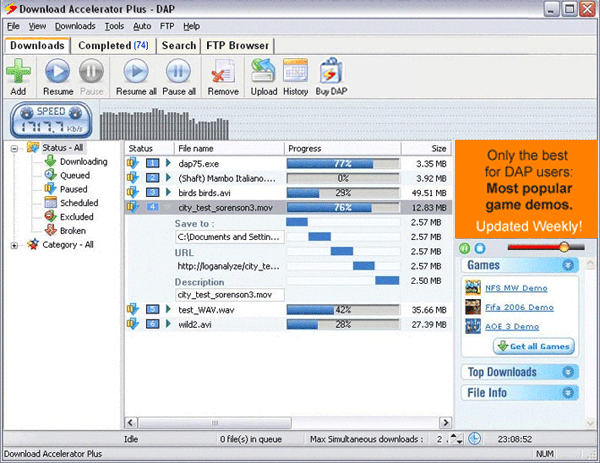
Download Accelerator Plus (DAP) is a download manager that increases download speed and reliability. It searches for mirror sites that will most effectively serve your downloads and establish multiple connections from a single or multiple servers for optimal utilization of dial-up or broadband connections.
In addition, DAP increases the reliability of the download process, it automatically recovers from shutdowns, lost connections, and other errors, thus DAP overcomes download interruptions and allows you to resume an interrupted download rather than start it all over again. DAP is fully integrated into the browser, and features a set of convenience.
| Developer: License / Price: Size / OS: Binary Format: Last Updated: Category: | Sprrdbit Ltd. tril/ USD 29.95 2.6 MB / Mac OS X PPCAPRIL 4th, 2012, 08:37 UTC Home / Internet Utilities |
Related Posts:
You May Also Like


0 comments:
Post a Comment